Accessible Model Interface · v1.0.0.3
Independent desktop client by Arizoft Games. Not an xAI or SpaceXAI product — not branded, sponsored, or affiliated. This ami.grok.me address is Grok Build hosting, not an official site.
Direct access to Grok. No harness games. No middleman.
Are you reading techtwit, confused about the usage complaints that get batted around? A consumer-tier user wondering why your sub doesn’t do what you expected? Interested in the real nuts-and-bolts of LLMs — what the jargon really means, and when it means nothing at all? Maybe not comfortable using the command line, or have physical issues that make it more difficult?
Meet AMI.
Free, GPL-3, open source. You buy API credits from xAI. AMI bills nothing on top. Grok is a trademark of its owner; AMI uses the public API as a customer.
Who AMI is for
Reading techtwit, still lost
Usage complaints get batted around like everyone already knows the rules. AMI puts the meter, the model list, and the request itself on screen so the argument has numbers.
Your sub is not doing what you expected
Consumer-tier products hide the cap until you hit it. AMI talks to the Grok API at list prices, with a budget you set, and a running total you can actually read.
You want the nuts and bolts
Tokens, effort, cached prompts, tool calls, reasoning spend. AMI exposes the structure of the request so the jargon either means something — or you can see that it doesn’t.
The command line is a barrier
Not everyone wants to paste curl. Some people cannot. AMI is a desktop window: menus, a text box, a spend panel. Direct API access without treating the keyboard like a compiler.
Genesis
Built because the wrappers failed first
I built AMI last year because I was fed up with the harness issues around the grok.com apps — days when the model would collapse into complete unusability. Typing one perfect line of code at a time, with my real query as just a small part of it, was frankly stupid.
AMI gave me direct access to the Grok API, with the full menu of models, at the direct API prices. No sub, no middleman, and perfect control of what I was paying for. I learned a great deal.
I’ve released it as free, open-source software so other people can enhance their knowledge of the AI ecosphere and gain a little more control. You’ll still have to pay xAI for API credits, but you may find that much less expensive than upgrading a subscription — and you may learn a lot about ways to extend your usage on other subscriptions as well. AMI is my tool; it is not an xAI or SpaceXAI product.
Under 1,500 tokens of hardcoded context. The rest of the window is yours: project data, codebases, instructions. Sessions are inspectable. Spend is a number, not a vibe.
The window
What you’re looking at
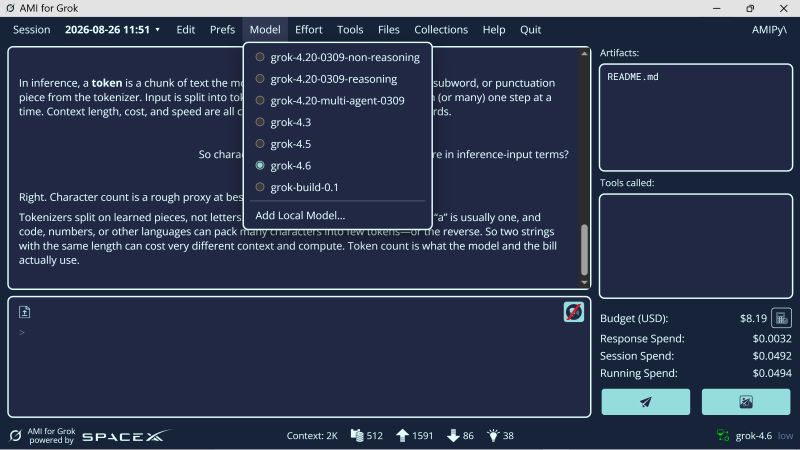
AMI is a Windows desktop application. Menus along the top: Session, Edit, Preferences, Model, Effort, Tools, Files, Collections, Help. The rest is the work surface — output, input, artifacts, spend, and the token strip.
1
Model menu
The full current Grok list, including reasoning, multi-agent, build, and Add Local Model. No wrapper deciding which one you “really” meant.
2
Artifacts
Output files live on disk, in a list you can click. Not a disappearing chat bubble.
3
Tools called
When the model reaches for a tool, you see the name. Silence here is also information.
4
Budget
A hard dollar cap, plus response / session / running spend. The bill is not a surprise at the end of the month.
5
Token strip
Context, cached, prompt, output, reasoning. This is what you actually pay for — not character count, not “messages.”
Capabilities
The API, without treating you like a compiler
Multi-model access
Pick any Grok language model the API currently lists, updated in real time. Local models can be added from the same menu.
Stateful responses
Uses the Grok Responses API so the server stores the chain. You do not re-send the whole history every turn.
Precise cost control
Budget in dollars. Response spend, session spend, running spend. Token counts for context, cache, prompt, output, and reasoning.
Image outputs
Imagine 2.0 from a dedicated prompt path, not buried in a chat that forgets you asked for a picture.
Files in, files out
Upload text or still images. Artifacts land on your machine. View, copy, move, or delete with one click.
Collections RAG
xAI Collections cut repeated search cost and keep the retrieval on a corpus you chose.
Tools and effort, on purpose
Enable tool calls individually. Set reasoning effort where the model supports it. See what was actually invoked.
Your working folder
Point Grok at a project root. Custom instructions, user info, even a persona — without stuffing a 20k-token system prompt you never see.
Sessions you can inspect
New, resume, or delete. Thirty days of history. Examine the last request that was actually sent.
Decoder
What the jargon really means — and when it means nothing at all
AMI exists so these words stop being atmosphere. Search a term, or open any row. The right-hand column is the one marketing copy hopes you never read.
What it actually is
A token is a learned chunk of text — a word, a piece of a word, a number, a space, punctuation. The tokenizer splits your input into these pieces. English prose is often roughly four characters per token, but code, other languages, and odd Unicode can pack very differently. Two strings with the same character count can cost very different amounts.
When the word is empty
When someone quotes a character limit, or counts words, and then talks about cost or “how much context you have left,” they are using the wrong ruler. Character count is a rough proxy at best.
Token lab
Character count is a rough proxy at best
AMI’s own help text says this out loud. Tokenizers split on learned pieces, not letters. Type below and watch the two rulers disagree. This is a teaching estimate (~4 characters per token for English prose) — the live AMI strip reports what the API actually billed.
- Characters
- 317
- Words
- 58
- Est. tokens
- 79
- Chars / token
- 4.01
If this were billed as grok-4.6 input
$0.000158
At $2.00 / 1M input tokens, under the 200K threshold, ignoring cache. Output and reasoning are extra. AMI shows those as separate meters so a cheap-looking prompt cannot hide an expensive think.
Two rulers
The meter
Direct API prices. No sub, no middleman.
You’ll still pay xAI for credits. AMI does not take a cut, does not sell keys, and will never ask for a card. The numbers below use public xAI list rates as of September 2026 so you can see the shape of a bill. Confirm live rates on docs.x.ai. Long-context thresholds and reasoning tokens are not in this toy calculator — AMI’s spend panel is.
Estimated month
$1.11
About $0.0056 per turn, before reasoning tokens, tools, or images. Compare that to upgrading a subscription you cannot inspect. Heavy days still add up — that is the point of a budget you can see.
| Model | Input | Cached | Output | Context |
|---|---|---|---|---|
| grok-4.6 | $2.00 | $0.50 | $6.00 | 500K |
| grok-4.5 | $2.00 | $0.30 | $6.00 | 500K |
| grok-4.3 | $1.25 | $0.20 | $2.50 | 1M |
| grok-4.20-0309-reasoning | $1.25 | $0.20 | $2.50 | 1M |
| grok-4.20-0309-non-reasoning | $1.25 | $0.20 | $2.50 | 1M |
| grok-4.20-multi-agent-0309 | $1.25 | $0.20 | $2.50 | 1M |
| grok-build-0.1 | $1.00 | $0.20 | $2.00 | 256K |
Prices are USD per million tokens, under the 200K prompt-token threshold. Imagine 2.0 is billed per image, not in this table.
First hour
Getting started
- 01
Install
Download the Windows setup executable and run it. If SmartScreen says the file may be harmful, open More information and choose Run anyway. Or clone the repository and build from source.
- 02
Get keys from xAI
AMI cannot sell you credits and will never ask for a card. Create an xAI account, add API credits, and generate an API key plus a Management API key at console.x.ai. Keys stay on your machine.
- 03
First launch
Paste the keys, give the session a name, write any custom instructions. Set a working folder if you have a project. Set a budget you can live with.
- 04
Pick a model and talk
Type like a person. Watch the token strip and the spend panel. Turn tools on only when you want them. Resume a session later if the chain is still useful.
Release
AMI-1.0.0.3-setup.exe
Windows 10 and later. Python 3.12 under the hood; you do not need to install it for the setup executable. Voice uses Piper 1.3. Built with the Grok API via xai-sdk.
SHA-256
5C86D7B588A63F0FEB0718090F63B12D95C01CD843E0165E39ACC748DA8BB19FGet-FileHash -Algorithm SHA256 .\AMI-1.0.0.3-setup.exe
If Windows says the file may be harmful, choose More information, then Run anyway. AMI never asks for financial information. Keys are stored locally.
Safety notes
- Never share API keys, passwords, or financial information in conversation with Grok that you would not put in a social-media post.
- Pre-purchase credits from xAI, or set spend limits — AMI’s budget is a local brake, not a replacement for the provider’s.
- Report suspicious financial requests to [email protected]. AMI cannot provide an API key or credits. Never enter card details into the AMI interface.
- AMI is an independent project by Arizoft Games. It is not owned, produced, sponsored, endorsed, maintained, or supported by xAI or SpaceXAI. The ami.grok.me host is Grok Build publishing, not a SpaceXAI property. Licensed under GPL-3. Source at ArizoftGames/OS_AMI.